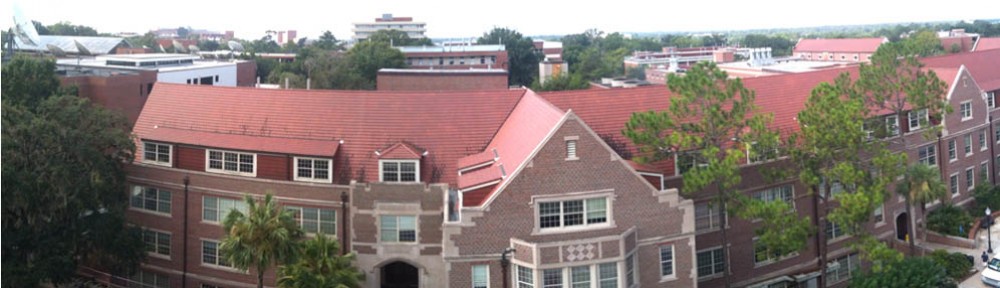
Use WordPress.com to create a teaching portfolio

Jeff Neely developed his website when he took Mass Communication Teaching in 2007.

Creating a teaching portfolio can be helpful as you prepare to enter the job market for a faculty position. Some job postings will ask you to submit a teaching portfolio or materials that would be in a teaching portfolio, such as a syllabus you’ve developed or a teaching philosophy.

A great way to have those materials available for others to review and to demonstrate your own technology skills is to have your teaching portfolio posted online.

As your final project for the course, you are to create an online teaching portfolio, using materials that you have been developing this semester, including your vitae and your undergraduate course materials.

You will be creating the portfolio as a WordPress blog. Advances in WordPress have made it a great choice for developing what used to be termed a website. More organizations are converting from coded websites to WordPress blogs. Our college’s “website” is, in fact, a WordPress blog — http://www.jou.ufl.edu

In Monday’s class, we’ll have workshop to work on your WordPress site. Here’s what you need to do.
Start mapping out what you’d like your online portfolio to include. Make a list and have your materials as digital files. Photos should be optimized for the Web. Slide presentations should be saved as PDF handouts. If you aren’t familiar with how to do that, we’ll review in our workshop.

Set up your WordPress account. Be sure to set up a free WordPress.com account and not a WordPress.org account. Start exploring the site. If you’ve selected a theme, that can help you be better prepared. A theme I think would work well for a portfolio is Twenty Eleven, which is the theme I used for this blog.

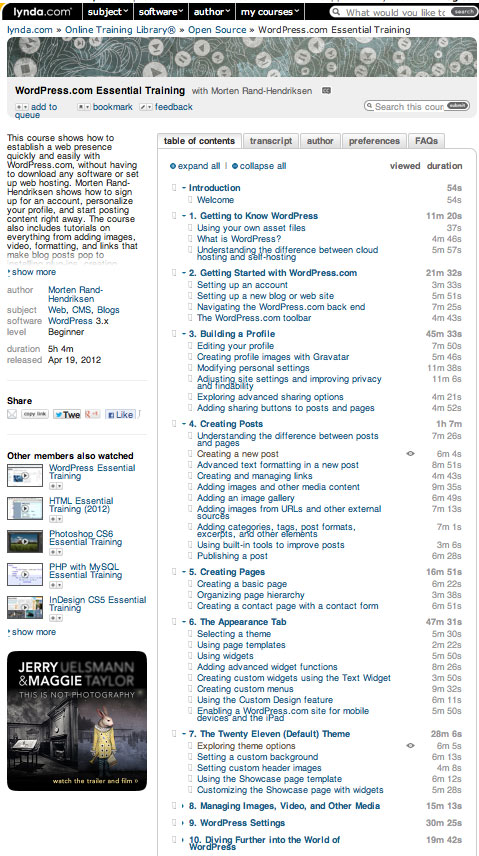
Watch Lynda.com videos to help you learn about using WordPress.com. As a UF student, you have access to hundreds of free Lynda.com videos. This is a great resource. To learn about WordPress, I’d suggest that you watch tutorials in WordPress.com Essential Training by Morten Rand-Hendriksen. (When you go to Lynda.com, click on the B for blogging and then select this training package.) You’ll see that the training is divided into dozens of short videos — similar to the Khan Academy approach to training. You can watch some of these tutorials prior to our Monday workshop and then watch others as you continue to work on your online portfolio. Most are just a few minutes.

Bring with you to class: Your laptop (be sure it’s charged) and digital files. Those files can include your bio, a headshot (and I’ll bring my camera to take headshots), your vitae, your course syllabus, your slides from your teaching presentation, etc. And I know you’ll bring your I’m-ready-to-learn outlook.

Here are two sample online portfolios from former students in Mass Communication Teaching:

Katie Abrams was a doctoral student in UF’s Ag Communications program. Visit her website to see how she organized materials.

Jeff Neely (website at top of post) developed his website in 2007 when he was a student in Mass Communication Teaching. At that time, we created online portfolios in Dreamweaver. Using WordPress.com makes the whole process much easier!

If you’re interested in learning more about blogging, which could become an asset for your future teaching, you should consider taking Multimedia Blogging (MMC 6930) next semester with Dr. Judy Robinson.

Students in the course develop their own blogs and learn to self-host and incorporate multimedia — including audio and video —  into their blogs.

Fred Stephenson’s ‘Extraordinary Teachers’ can help you develop your own teaching philosophy

In Monday’s class, we’ll talk about Fred Stephenson’s “Extraordinary Teachers: The Essence of Excellent Teaching” as a way of exploring teaching philosophies.

As part of your written preparation for our discussion, please read Stephenson’s opening section where he discusses qualities that make teachers extraordinary. Then read 10 of the teachers’ essays.

In writing three to four pages reacting to these materials, include a listing of three qualities that you would like students to use in describing you as a teacher.

For this written assignment, bring your reaction paper as a printed copy.

How to motivate students to complete out-of-class assignments

by Amal Bakry
Ph.D. Student, University of Florida

This is a summary of our discussion from my teaching presentation on how to motivate students to complete out-of-classroom assignments.

Research indicates that very few college students get to reach their full potential by graduation. The major difference between students who reach their full potential and those who don’t is motivation. Some students are intrinsically motivated and care mainly about learning for its own sake.  Other students are extrinsically motivated and are interested in grades and recognition. It is important to foster both types of motivation in order to encourage students to do their out of classroom assignments.

The findings of an MIT study on rewarding performance of college students indicate that the higher the reward the lower the performance. A reward is considered to be an “extrinsic motivator.” While education researchers initially believed that teachers should foster only intrinsic motivation, they have come to believe that extrinsic motivation is of equal importance and that it needs to be fostered as well.

Highly successful assignments have the following characteristics:

  • Clarity of goals
  • Clarity of directions for students to know what is expected of them
  • Clarity of evaluation criteria
  • Clarity of skills that students need to have in order to complete assignment
  • Clarity of timing needed for students in order to complete assignment
  • Teachers need to provide regular feedback
  • Teachers need to provide guidance to students
  • Assignment needs to be introduced through an assignment packet
  • Teachers need to indicate the available resources needed in order to complete assignment

To structure highly effective assignments, teachers need to avoid the following:

  • Expecting an ideal response from all students
  • Providing confusing commands
  • Providing insufficient resources
  • Giving too many questions to be answered in any one assignment
  • Setting an impossible time restraint

Here are some resources that I have found to be particularly helpful on this topic:

  1. Svinicki, M. and McKeachie, W. J. (2011). McKeachie’s Teaching Tips. Wadsworth, Cengage Learning.
  2. MIT study “the effect of rewards on college students’ motivation” video http://www.youtube.com/watch?v=QM9p4o050EY&feature=related
  3. The in-depth interviews I have conducted to better understand students’ attitudes towards assignments http://www.youtube.com/watch?v=QGLYx1gXQGw&feature=plcp
  4. “Structuring Assignments for Success,” Deborah DeZure, Michigan State University http://fod.msu.edu/oir/course-design-assignment-design
  5. “Motivating students” http://serc.carleton.edu/NAGTWorkshops/affective/motivation.html
  6. “Motivation in college students” http://lac.smccme.edu/motivation.htm
  7. “Some ideas for motivating students” http://www.virtualsalt.com/motivate.htm

Amal Bakry is a student in Mass Communication Teaching (MMC 6930).

5 favorite tools for using Sakai as a course management system (CMS)

by Annelie Schmittel, PhD Student Mass Communication,  University of Florida

Course management systems (CMS) have undergone steady transitions ever since the birth of the World Wide Web. These transitions certainly impacted (and still impact) many college campuses in the country. The progression towards online teaching and even the expectations of use of technology in regular classrooms only fuels the need for professors, instructors or teaching assistants to become familiar with course management systems and the tools within.

Here at the University of Florida we recently switched from Blackboard to Sakai. While Sakai may not be the most intuitive or user-friendly CMS out there, it does offer a variety of tools that can be of great benefit to instructors.

My TOP 5 Sakai tools are:

1. Site Info

When your course site is first set up, a few features are automatically included on your left-hand navigation. Site Info allows you to customize your left-hand navigation bar, both as far as content and order of navigation links. You can include tools that you will implement in your course, while at the same time eliminating tools that you will not use. This will help students and instructors in terms of organization and clarity.

Continue reading

Developing undergraduate course materials lets you demonstrate strategies for your teaching and for student learning

The major project for Mass Communication Teaching (MMC 6930) is developing materials for an undergraduate communications course. We’ve been working on that project since the second week of class when you met with me to discuss the course you were considering and how developing that course would fit with your teaching goals.

You’ll be turning in your syllabus – paper version – in class on Oct. 29. By the end of class, you will be posting at least a portion of your syllabus on your online portfolio.

Here are the parts of the syllabus that you will be turning in:

Proposal for course – You turned in your proposal on Sept. 17. Revise that proposal to reflect any changes you’ve made to the course, such as including prerequisites, and to add references to the syllabi you used for developing the course.

Syllabus – Your syllabus should comply with the expectations of a course syllabus set out by the University of Florida — www.aa.ufl.edu/Data/Sites/18/media/policies/syllabi_policy.pdf

You also want your syllabus to reflect best practices as discuss in McKeachie’s Teaching Tips and What the Best College Teachers Do. That means having student learning outcomes that are connected with student assessment, an explanation of grading, and a variety of teaching and learning strategies. You want your syllabus to convey your organization and your interest in the course and the students. See the UF Resources page for links to other resources on campus that you will want to include in your syllabus.

Your syllabus should be based on UF’s schedule for Spring Semester 2013. Include a listing of each class meeting and what the reading assignment or other homework would be for the class. Also include due dates for major assignments and test dates. My personal preference is to speak directly to the students in the syllabus. Here’s an example from my syllabus for Multimedia Writing: “The lab instructors and I want to help you be successful in this course. If you need individual assistance beyond the help you receive in lab, it is your responsibility to meet with your lab instructor or me during office hours or set up an appointment for another time.”

Timeline – The timeline is a planning tool for you and would provide a foundation for developing a lesson plan for each class meeting. You wouldn’t give the timeline to your students. For each class meeting, include the student learning objectives and a brief explanation of what activities you’d include in class, such as presentation, working in teams, a minute paper, watching a video or listening to an audio file, or class discussion. Your overall course should reflect a variety of instructional strategies. I distributed a sample timeline in class.

Assessment activity – Develop an assessment activity that would be a significant portion of the students’ grade for the semester. This may be either an exam and answer key OR a major project with a grading rubric. The assignment should reflect best practices from the presentations made by Antionette Rollins and Chris Wilson.

Two lesson plans – Select two days (or one three-hour class) and develop lesson plans. The lesson plans should include student learning objectives, how you would begin the class and the class content. Your lesson plan can incorporate bullet points or phrases. The lesson plan should be complete enough that you could teach from it. For examples, if you are going to have a class discussion, you need to list the questions that you would use to guide the discussion. If you are going to have a slide presentation, include a handout of the slides. Select two days where you would have a major role in the class. So do not select a day when you are giving a test, having a guest speaker, or having group presentations. I distributed a sample lesson plan in class.

When you bring your materials to class, please organize them in this order and have a large clip, binder or envelope for them.

We’ll spent part of class on Monday reviewing classmates’ course packets and discussing the process of curriculum development.

How do students become well-rounded in media skills while abiding by accreditation restrictions?

by Alexa Lopez
English Education graduate student, University of Florida

Before this year, the curriculum at the University of Miami’s School of Communication had been set in a way that restricted the content and number of courses that students, including myself, could take as they pursued their degrees.

For instance, according to the school’s bulletin for 2010-2011, which I fell under, I could only take up to 42 credits in the school as part of the journalism program; the remaining 78 credits for my degree had to come from non-communication courses taken for a required second major plus electives.
Also, if you took more than the capped amount of credits allotted for your program in the School of Communication, you had to take that same number of credits outside of the School of Communication. That is, if I wanted to take an extra three-credit course in the School of Communication (resulting in a total of 45 communication credits), I had to balance it with another three-credit course in an outside school.

Continue reading

6 advantages of rubrics for students and teachers and how to create rubrics

by Chris Wilson
Ph.D. Student, University of Florida

In this post, I’m sharing a summary of our discussion from my teaching presentation on evaluating student assignments using rubrics.

A rubric is an assessment tool that breaks an assignment into its component parts and defines specific criteria to evaluate a student’s level of performance.

A rubric consists of three basic elements:

  1. The traits or dimensions that identify the skills and knowledge required to complete the assignment.
  2. A scale that indicates the different levels of performance for the assignment.
  3. Descriptions of each trait at each level of performance. However, in some rubrics only a description of the highest level of achievement is included.

Rubrics offer a number of advantages to teachers and students:

  1. Rubrics allow busy professors to provide timely feedback to students.
  2. Rubrics prepare students to use teacher feedback to improve on future assignments by allowing them to compare their level of performance with the ideal.
  3. Rubrics encourage students to think critically about the quality of their own work.
  4. Rubrics facilitate communication with other graders and teachers, as well as student service personnel who may be helping students to complete their assignments.
  5. Rubrics allow teachers to evaluate their own teaching by revealing areas of strength and weakness in student assignments.
  6. Rubrics can level the playing field for students of all races, languages, etc., by fostering a dialogue about expectations between teachers and their students.

Continue reading

Providing outside-of-class learning options when university holidays (or weather emergencies) cancel class

When your course is scheduled is one of the challenging aspects of planning a course.

Will the course be one hour three times a week, three hours once a week, or some other option? Every timeframe provides its own opportunities and challenges.

And then there’s the issue of when the class doesn’t meet due to university closings. Most often those closing are part of the university’s calendar – Labor Day, Veterans Day, Thanksgiving, Spring Break, Martin Luther King Jr. Day, and, for us at UF, Homecoming. Sometimes the closing is due to a weather event, from hurricanes to snow storms, depending on where you are teaching.

For our class, we’re missing two three-hour class meetings this semester because of closings for Labor Day and Veterans Day.

I’d like for each of you to take on an outside-of-class opportunity to provide a learning experience for you as a teacher – and potentially to be an addition to your CV.

Attend Advising 101
This workshop and discussion is being held by the College’s Student Services on Tuesday, Oct. 9, beginning at 11:45 a.m., in 3032 Weimer. The workshop will include discussion of topics including pre-professional requirements, Gordon Rule, degree audits and outside concentrations. The workshop is open to faculty, graduate students and adjuncts. You don’t need to pre-register. Pizza and beverages will be served.

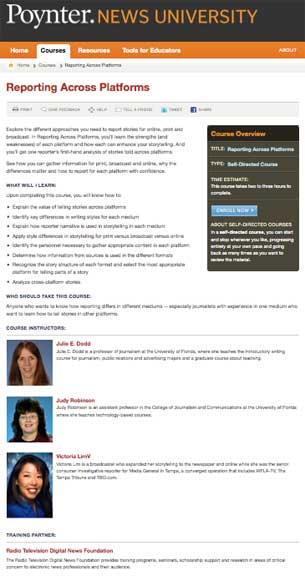
Reporting Across Platforms is one of the many free courses your can take online at NewsU. This is a course that I helped create with Judy Robinson, Victoria Lim, and a NewsU instructional designer.

Take an online course on Poynter’s NewsUhttp://newsu.org
Set up an account, and you may take more than 70 free online courses. Most courses take from 20 minutes to three hours to complete. I’m going to encourage you to take one of the two courses I helped create, as I’d like to talk in class about what was involved in creating online materials.

Reporting Across Platforms — http://www.newsu.org/courses/reporting-across-platforms

Video Storytelling for the Web — http://www.newsu.org/courses/video-storytelling-web

Attend one of the training workshops offered by UF’s Teaching Center.
The workshops typically are two hours. Courses scheduled for this fall include Sakai II, Troubled and Disruptive Students, Copyright in the Classroom, Testing and Grading, and Creating a Teaching Portfolio. Go to The Teaching Center website, the click on the link to workshop descriptions and to register online.
http://www.teachingcenter.ufl.edu/ta_development.html

Complete UF’s Sexual Harassment Prevention online training course.
Learn how to go online to take the course — http://www.hr.ufl.edu/eeo/training.htm

We’ll discuss these options in class, and you may have other learning opportunities to add to the list.

Class members demonstrate best practices in creating and using PowerPoint

Before our class discussion on PowerPoint, I asked class members to email me a slides (or slides) that they had created for teaching class that they would be willing to share with the class when we discussed PowerPoint.

I had two volunteers.

After the class had discussed the pros and cons of using PowerPoint, I asked each volunteer to talk about the slide(s) — a little background on the course and how the slide was used.

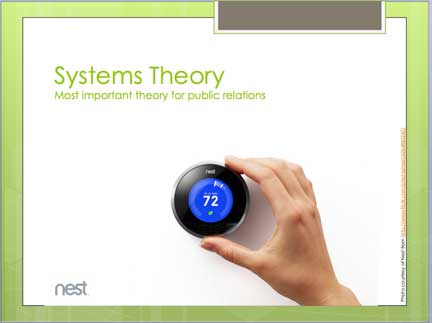
Here’s the slide Chris Wilson shared from Public Relations Strategies and how he used the slide:

One of the theories that students learn about in the public relations strategy course is systems theory. This theory explains why public relations is necessary and how public relations can help organizations manage relationships with external publics.

This slide allows me to use the analogy of something that students are familiar with — a thermostat — to explain how organizational systems work.

1) A goal is established when someone sets the temperature they desire on the thermostat.

2) The thermostat triggers an output (e.g., either cold or hot air) based on the goal that has an effect on the temperature of the room.

3) The thermostat has a feedback mechanism (i.e., a thermometer) to tell the system when to start or stop its output (i.e., cold or hot air).

4) The thermostat makes the decision to start or stop based on a comparison between with the actual room temperature and the goal temperature.

5) Once a goal has been set, the thermostat continually monitors the environment to see when additional changes are necessary.

After thinking about these steps, students are able to see that organizations set goals that they cannot achieve without cooperation from external publics. Public relations become like the thermostat providing feedback and outputs that allow organizations to adapt to or influence their environments.

Chris led the class through part of this discussion as he shared the slide with them. Afterwards, we talked about how many minutes Chris spent on this one slide — probably 10 to 15 minutes of discussion. That helped illustrate why teachers need to realize that often one slide can promote a great deal of discussion.

Next was Kevin Hull, who created his PowerPoint presentation when he was teaching media at Topsail High School in Hampstead, N.C.

Here’s how Kevin explained his presentation and two of the slides:

One of the requirements of the first day of school at my high school was to review all the class rules.  Since this was done in each class, I wanted to make mine a little different and hopefully more fun.  

I used the Sherlock Holmes finger puppet to “demonstrate” the various rules.  While it was incredibly time consuming to make this PowerPoint (took almost half a day), it was worth it in the end.  

I now had a fun way to introduce the “Class Rules” in all my classes, and it was re-usable each semester.  

It also introduced the class to Sherlock, who would become an important “member” of the class.

The class was full of smiles as Kevin and Sherlock explained the school rules. At the end of his presentation, several in the class told Kevin that Sherlock must be a part of his teaching presentation in class. One student said that his presentation was more like a movie rather than PowerPoint.

Kevin said he’s found the newspaper template online and had spent part of a day shooting Sherlock in action. The result made reviewing the rules a fun activity — and everyone was paying attention.

Slide-ology can help improve teachers’ PowerPoint presentations

PowerPoint.

As we discussed in class today, PowerPoint (or Keynote) is a teaching technology that you need to be able to use — often almost a requirement in a faculty job interview.

Nancy Duarte’s Slide-ology can help teachers make more effective PowerPoint/Keynote presentations.

We started our discussion of PowerPoint with a human continuum activity in the college courtyard. A human continuum is a class activity where students take a position on a continuum to represent their views on a particular issue.

I first asked the class to take a position based on how much PowerPoint had been used in the classes they had taken as college students. Two took the position that PowerPoint was used in almost every class they had taken. Two took the position that no PowerPoint had been used in college classes they had taken. Everyone else was spread along the line, with most saying that PPT had been used in about half of their classes.

Continue reading